Customer Record Invoice Table – Option to Hide System and Email Sent Columns

We’ve introduced new customization options to the Customer Record Invoice table allowing users to control the visibility of two specific columns: System and Email Sent? This enhancement helps tailor the invoice display to better suit user preferences and improve data clarity.
New Settings Location
- From the left-hand menu, click on Settings.
- Under Customer Settings, go to General Settings.
- In Customer Page Display Settings, you will find two new options:
- Display System in Invoice Table?
- Display ‘Email Sent?’ in Invoice Table?
Screenshots
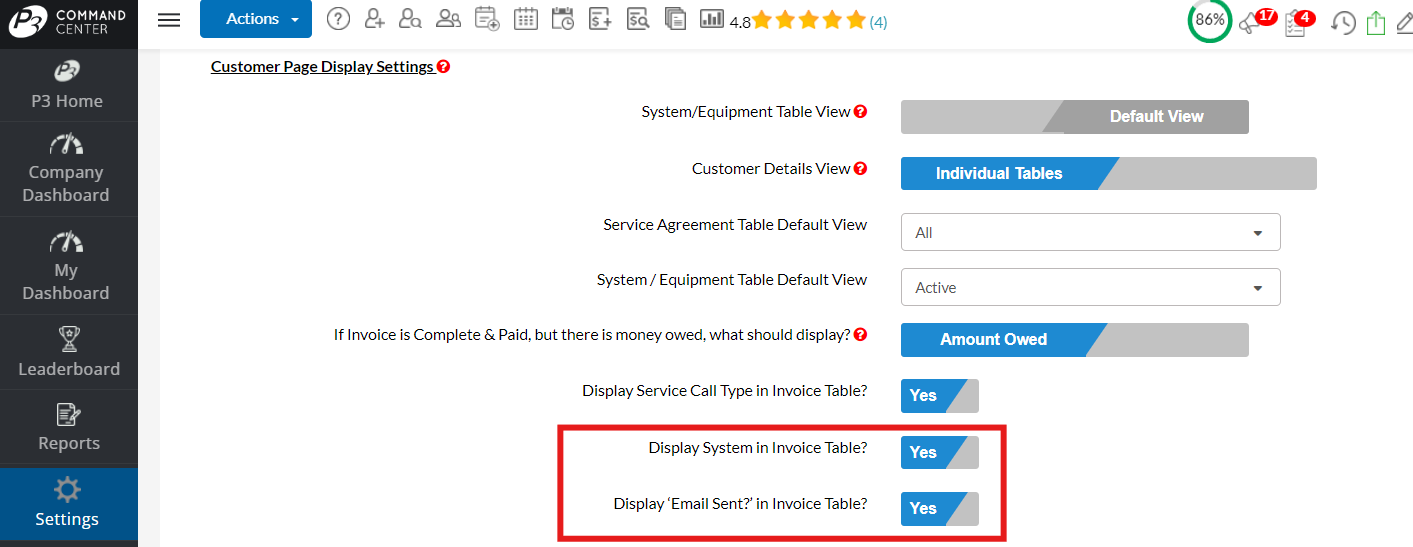
New Settings are set to YES
New Settings are set to NO
Notes:
- Users can declutter the invoice table by hiding columns that are not relevant to their workflow.
- Provides flexibility to customize the customer record interface to individual or team preferences.
- Helps users concentrate on the most important data for their processes without unnecessary distractions.
Comments
0 comments
Please sign in to leave a comment.